Air-Gapped Private AI: OpenClaw + Ollama for Sensitive Data
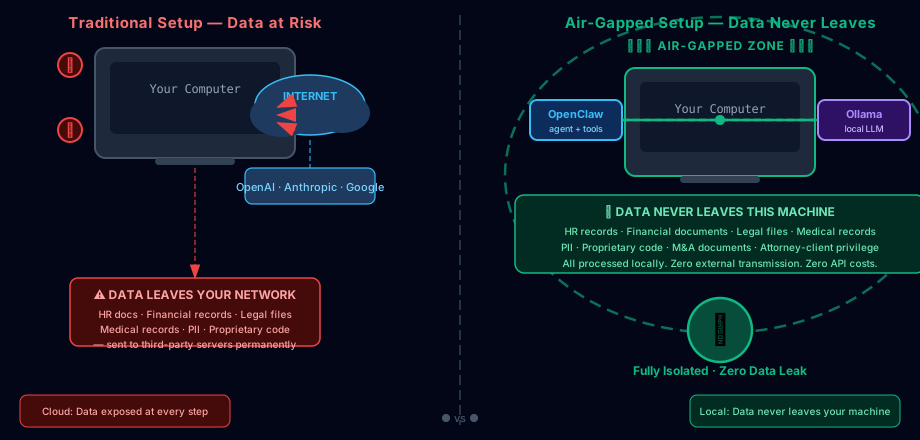
For when “we promise the data isn’t stored” isn’t good enough.
The Problem with Cloud AI for Sensitive Data
Cloud AI is convenient. It’s also a permanent, uncontrolled data leak.
When you send employee records to an AI API to summarize, or paste a legal contract into an online model — that data travels to someone else’s servers. Theirs. Their subcontractors. Their training pipelines. You have no visibility and no recall. For most business work that’s fine. For HR documents, medical records, financial statements, proprietary source code, or anything with PII — it’s a compliance nightmare dressed up as productivity.
The answer isn’t “be more careful.” The answer is architecture: the data never leaves the machine.
What This Setup Does
You run OpenClaw on a machine that has zero network access. Ollama handles LLM inference locally. OpenClaw handles the workflow, tool access, and orchestration. No outbound connections. No API calls. No data leaves.
┌─────────────────────────────────────────────────┐
│              AIR-GAPPED MACHINE                 │
│                                                 │
│   ┌──────────────┐      ┌──────────────┐       │
│   │  OpenClaw   │─────▶│   Ollama     │       │
│   │  (agent)    │◀─────│  (local LLM) │       │
│   └──────────────┘      └──────────────┘       │
│                                                 │
│   All processing happens locally.               │
│   Zero network access. Zero data egress.         │
└─────────────────────────────────────────────────┘
How It Works
1. Set Up Ollama
Install Ollama on your isolated machine and pull a capable model before severing the network:
# Install Ollama
curl -fsSL https://ollama.com/install.sh | sh

# Pull models (do this before air-gapping)
ollama pull qwen3.5:27b       # 18GB — RECOMMENDED: best balance of quality + RAM
ollama pull qwen3.5:14b       # 9GB — strong alternative for 16GB RAM machines
ollama pull qwen3.5:4b        # 2.7GB — no-GPU fallback, still surprisingly capable
ollama pull llama3.2-vision   # vision model — see Vision section below

# Start the local API (drop-in compatible with OpenAI API)
ollama serve
Ollama’s local API runs at http://localhost:11434. Point your OpenClaw config to it with no changes to prompt structure.
2. Configure OpenClaw to Use the Local Engine
# openclaw.yaml
providers:
  - name: ollama-local
    provider: ollama
    api_base: http://localhost:11434
    model: qwen3.5:27b

tasks:
  sensitive-document-review:
    provider: ollama-local
    prompt: |
      Review this HR document and flag any compliance issues,
      missing fields, or language that could create liability.
      Summarize findings in a table. Flag critical issues first.
3. Sever the Network
Option A — Hardware air-gap (strongest): Physically remove or disable the Wi-Fi card and ethernet adapter. For a server, don’t connect it to any network at all.
Option B — Software firewall (belt and suspenders):
# Block all outbound traffic — last line of defense
sudo iptables -P INPUT DROP
sudo iptables -P FORWARD DROP
sudo iptables -P OUTPUT DROP
sudo iptables -A INPUT -i lo -j ACCEPT    # loopback only
sudo iptables -A OUTPUT -o lo -j ACCEPT
Option C — Dedicated VLAN: Isolate on a private VLAN with no internet egress and no access to sensitive network segments.
For anything touching genuinely sensitive data: Option A + Option B.
4. Run Your Workflows
tasks:
  hr-document-review:
    provider: ollama-local
    triggers:
      - cron: "0 9 * * 1-5"
    steps:
      - read: "/data/hr/pending/*.pdf"
      - prompt: |
          Review each document for:
          - Compliance gaps vs. current labor law
          - Missing required fields or signatures
          - Language that could create liability
          Summarize findings in a table. Flag critical issues first.
      - write: "/data/hr/reviews/daily-summary.md"
Which Local Model Should You Run?
Qwen 3.5 is Alibaba’s strongest release to date and the current recommended default for local inference. It comes in several sizes — all share the same architecture improvements over Qwen 2.5, including significantly better reasoning and instruction following.
Recommended Models (March 2026)
| Model | Size on Disk | RAM Required | Context | Best For |
|---|---|---|---|---|
| Qwen 3.5 27B ⭐ | ~18 GB | 24–32 GB | 256K | Recommended default. Best quality-per-RAM ratio. Desktop/gpu workstation. |
| Qwen 3.5 14B | ~9 GB | 16 GB | 256K | Mid-range hardware. Still excellent at document processing. |
| Qwen 3.5 4B | ~2.7 GB | 6–8 GB | 32K | No-GPU laptops. Surprisingly capable for simple tasks. |
| Qwen 3.5 122B MoE | ~55 GB | 64+ GB | 256K | Server-grade. 10B active params = Qwen 3.5 14B capability at lower inference cost. |
| Llama 3.3 8B | ~4.9 GB | 8 GB | 128K | Budget/legacy option. Qwen 3.5 4B beats it at lower RAM. |
| DeepSeek R1 32B | ~23 GB | 32 GB | 128K | Hard reasoning tasks. Best for multi-step math and logic. |
Start with Qwen 3.5 27B. If you have 32GB RAM on your machine, it’s the highest-quality local model available for document processing, classification, and summarization without a server-grade setup.
GPU VRAM Requirements
Speed matters. Running on CPU works, but GPU inference is 10–30x faster. Here’s what you need for real-time interaction:
| Setup | VRAM | GPU Examples | Inference Speed |
|---|---|---|---|
| Qwen 3.5 4B (Q4) | 4–6 GB | RTX 3060, M1 Mac | 30–50 tok/sec |
| Qwen 3.5 14B (Q4) | 8–10 GB | RTX 3080, RTX 4060 Ti | 20–35 tok/sec |
| Qwen 3.5 27B (Q4) | 16–20 GB | RTX 4090, A5000, M3 Pro | 15–25 tok/sec |
| Qwen 3.5 27B (Q8) | 28–32 GB | RTX 4090 (24GB), A100 40GB | 20–30 tok/sec |
| Qwen 3.5 122B MoE (Q4) | 14–18 GB active | RTX 4090, A5000 | 25–40 tok/sec |
Without a GPU, CPU inference on Qwen 3.5 27B runs at 2–5 tokens/second — usable for batch processing, painful for interactive use. Prioritize the 14B model if you’re CPU-only.
Vision-Capable Local Models
Need to process screenshots, scanned documents, photos of receipts, or visual inspection tasks? Several local models handle this natively:
ollama pull qwen2.5vl:14b       # 9GB — best vision model for Ollama, 128K context
ollama pull qwen2.5vl:72b       # 45GB — strongest vision, requires 48GB+ RAM
ollama pull llama3.2-vision:11b # 7.5GB — solid vision, Apple Silicon friendly
ollama pull llama3.2-vision:90b  # 55GB — close to cloud vision quality
ollama pull gemma-3-27b         # 18GB — Google model, multimodal + strong reasoning
Vision models let you do things like:
- Parse handwritten forms or stamped documents from photos
- Analyze screenshots of dashboards or UIs
- Process scanned contracts with mixed handwriting and print
- Inspect visual outputs of automated systems
All fully offline. For an air-gapped security setup, adding vision means you can process paper documents, whiteboard photos, and physical evidence — not just digital files.
Tool-Use Capable Local Models
Modern agents need more than text generation — they need to call tools, use browsers, execute code. Several open-weight models now handle this:
| Model | Tool Use | Browser Use | Best For |
|---|---|---|---|
| Qwen 3.5 (all sizes) | ✅ Native | ✅ via browser tool | Recommended default for agentic workflows |
| Llama 4 Scout | ✅ | ✅ | Massive 10M token context, best for large document agents |
| DeepSeek R1 | ✅ | ✅ (limited) | Strong reasoning + tool use, lower cost |
| Mistral Small 4 | ✅ | ✅ | Fast tool-use cycles, real-time agentic tasks |
| Qwen 2.5 Coder | ✅ | ✅ | Code-focused agent workflows |
Qwen 3.5 has the most robust tool-use implementation of any open-weight model as of early 2026. For OpenClaw workflows that need to use tools (file I/O, code execution, API calls), Qwen 3.5 is the recommended choice.
Traditional Setup vs. Air-Gapped
| Cloud AI | Air-Gapped Local | |
|---|---|---|
| Data leaves your network | ❌ | ✅ Never |
| API costs | ❌ Per-token fees | ✅ Zero |
| Internet required | ❌ | ✅ None |
| Compliance (GDPR, HIPAA, etc.) | ⚠️ Complex DPA required | ✅ Guaranteed data sovereignty |
| Model capability | ⚔️ Frontier — best on hard reasoning | ✅ Excellent for most tasks |
| Vision support | ✅ | ✅ (with local vision models) |
| Tool use / agentic workflows | ✅ | ✅ (Qwen 3.5, Llama 4) |
| Real-time web access | ✅ | ❌ (by design — intentional) |
| GPU required for speed | ❌ | ✅ Recommended |
| Hardware investment | ❌ None | ✅ Upfront cost |
Limitations to Know
- Frontier reasoning gap: On very hard multi-step reasoning (PhD-level math, cutting-edge code), frontier cloud models still lead slightly. For document review, classification, summarization, and most business tasks — local models are at effective parity.
- No real-time information: No web access by design. If workflows need current data, run a second OpenClaw instance with internet access for that work only, with proper data separation.
- Hardware investment: Qwen 3.5 27B at full quality needs 32GB RAM. Budget accordingly — a workstation with 64GB or an M3 Pro MacBook Pro handles it comfortably.
- No automatic updates: The machine is isolated. Model updates require physical media or a one-time controlled transfer.
What This Doesn’t Replace
Air-gapping is a physical security control — not a magic privacy button. It doesn’t protect against:
- A malicious local user with terminal access
- Keyloggers or malware on the machine itself
- Physical theft (full-disk encryption mitigates this)
- Insiders with legitimate access who misuse it
Combine air-gapping with standard access controls, audit logging, and need-to-know principles. The air-gap is your last line of defense — not your only one.
Is This Overkill?
For most people, yes. For data that actually matters — the stuff you’d lose sleep over if it leaked — it’s the only architecture that actually guarantees what you need.
Most “private AI” solutions are really just “we promise.” Air-gapping is “we couldn’t send this data out even if we wanted to.”
That’s a meaningful difference.
Want to try this with OpenClaw?
OpenClaw is free and open source. Get started at openclaw.ai
Try OpenClaw →